
- A threshold of 80 means that Alert Profile name contains Client record name in any order.
- A threshold of 85 means that Alert Profile name contains Client record name in same order.
- A threshold of 90 means that Alert Profile name contains Client record name in same order with no gaps.
- A threshold of 100 means that Alert Profile name matches exactly the Client record name.
- Year of Birth match is +60, Year of Birth mismatch is -60
- Month of Birth match is +20, Month of Birth mismatch is -20
- Day of Birth match is +20, Day of Birth mismatch is -20
- Missing information in any of the above fields is +/-0
Introduction
AML matches are scored using a custom W2 by FullCircl scoring algorithm. Matches that closely resemble your search terms will get a high score, while poor matches will be given a low score.
Threshold query options are available so you can set a minimum score that all your matches must pass. Setting a high threshold will mean your results are highly relevant but you may miss potential matches. Setting a low threshold ensures you don't miss any matches but you may receive more false positives. The thresholds you use depends on your risk appetite.
Name Matching Logic
W2 by FullCircl uses a numbered scoring system for name matching.
Date of Birth Matching Logic
For Date of Birth matching a numbered scoring system 0-100 (100 being a total match) with a weighting towards Year of Birth and positive/negative depending on factors that match/mismatch is used:
When calling records using a threshold on either Name and/or Date of Birth, only records matching that threshold or greater will be returned. In some cases the Date of Birth held within Sanctions records is not in a recognisable format, such as ‘circa 1960’ or ‘between 1965 and 1970’. In these, and other similar cases, we treat the Date of Birth as missing for threshold purposes.
Character Matching
Case Matching
Upper and lower cases characters are considered equivalent when matching. This has the effect of making name matching case insensitive.
Accented Character Matching
Ignore Accented Characters allows for records that have Latin accented characters in their names to be ignored and replaced with their English base counterpart, for example the name Pierre André would become Pierre Andre. (The accented é becomes a standard e)
Matching Configs
⚠️ Coming Soon: Matching Configs are still in development and are subject to change.
Matching Configs allow you to customise the matching logic in which AML matches are scored when searching. You can have one to multiple different levels of matches, allowing you to be able to cast a wide net, a fine tooth comb or anywhere in-between.
Currently you can only have one Matching Config for your company, this will be used on any AML service you perform a KYC search on via API or our Portal, as well as ongoing monitoring. Any updates to your Config will happen in real time, and previous versions (we call them snapshots) are saved.
Matching Levels
A Matching Config can contain multiple Matching Levels, each of them have a collection of rules which determine the matching logic, by checking if a name in our datasources is a potential match to your searched name. For each level you get to decide what name it has, a custom colour, the order of them and their rules.
Each level has an order starting from 1 at the top, descending down in priority. We start at level 1 and if the searched name does not match based on the logic we try the next level, and so on. This results in no match found if all levels are exhausted. This process is repeated for each of the potential names found within our datasources.
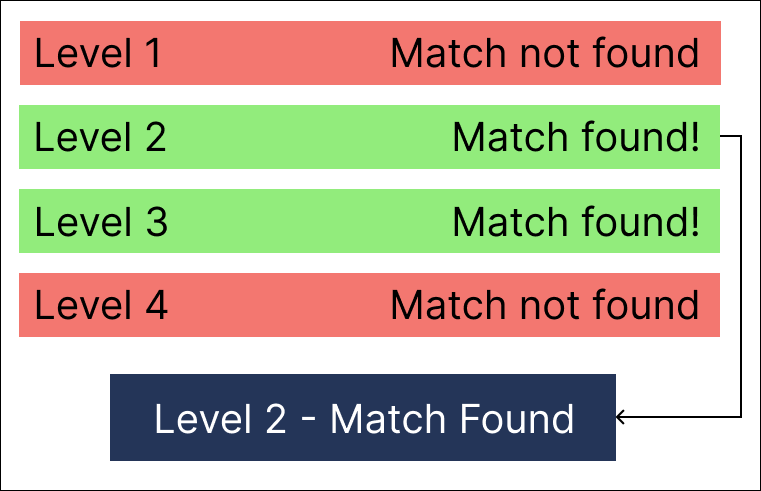
Matching Rules
Rules are what determine the logic for deciding if a name is a match or not. These come in different categories such as Ordering, Distance and Other. These offer similar functionality to our current Matching Thresholds, however now you can tailor everything to your specific requirements and risk profile.
Ordering
| Rule | Description |
|---|---|
| Correct Order | Forces potential matches to be in the same order as your searched name. e.g. A search for John Smith could return Smith John. |
| Extra Names Before | Allows potential matches that have any extra names before your searched name. e.g. A search for John Smith could return Elliot John Smith. |
| Extra Names In Between | Allows potential matches that have any extra names in between your searched name. e.g. A search for John Smith could return John Louis Smith. |
| Extra Names After | Allows potential matches that have any extra names after your searched name. e.g. A search for John Smith could return John Smith Harold. |
Distance
| Rule | Description |
|---|---|
| Term Distance |
This is also known as Edit Distance or the Levenshtein Distance. You can set this rule to a number, and that is the number of times you need to do something to the word to change it into a different one. e.g. Tom can be changed to Dom by substituting the T with a D - this is an edit distance of 1, because it took 1 action to perform. The valid actions for this rule are inserting, deleting and substituting. 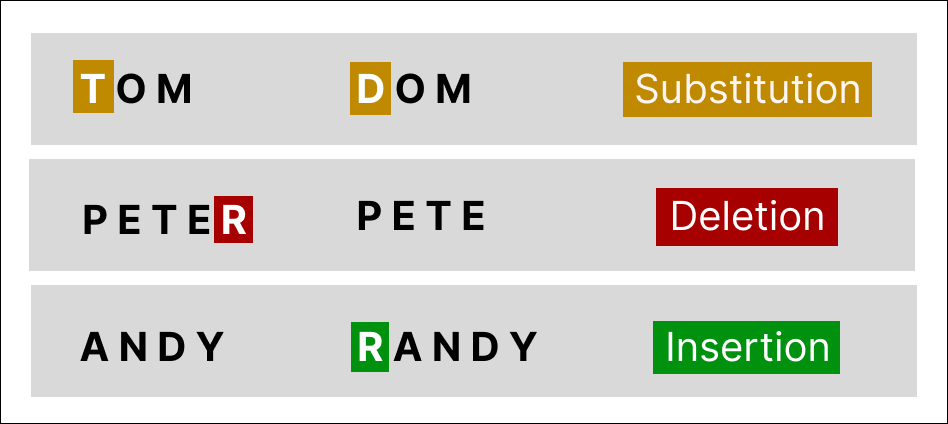 |
| Combined Distance | This setting will set a hard limit on the total edit distance of combined names. So if your searched name has a firstname and surname, and a potential matched name's firstname and surname both have an edit distance of 1, their combined distance is 2. Setting this rule to 2 would allow this potential match as a result, if it was set to 1 it would not. |
Other
| Rule | Description |
|---|---|
| Ignore Accented Characters | Allows potential matches where any accented characters can be mapped onto non-accented characters. See Accented Character Matching for more information. |
| Exclude Low Quality Aliases | Excludes any potential matches that are found but are linked to an alias that is considered low quality by our data suppliers. This option only excludes results for the Watchlist 002 service currently. |
Comments
0 comments
Please sign in to leave a comment.